You're away for a week and a friend is looking after the dog. The feeding times are in a note. The video of how he takes his pill is on your phone, the voice note about what scares him is buried in a chat, his vaccination record is a PDF in your email, and the night vet is a link you saved months ago. So you send five things through three apps, and on Saturday morning your friend scrolls through all of it with a hungry dog staring at them.
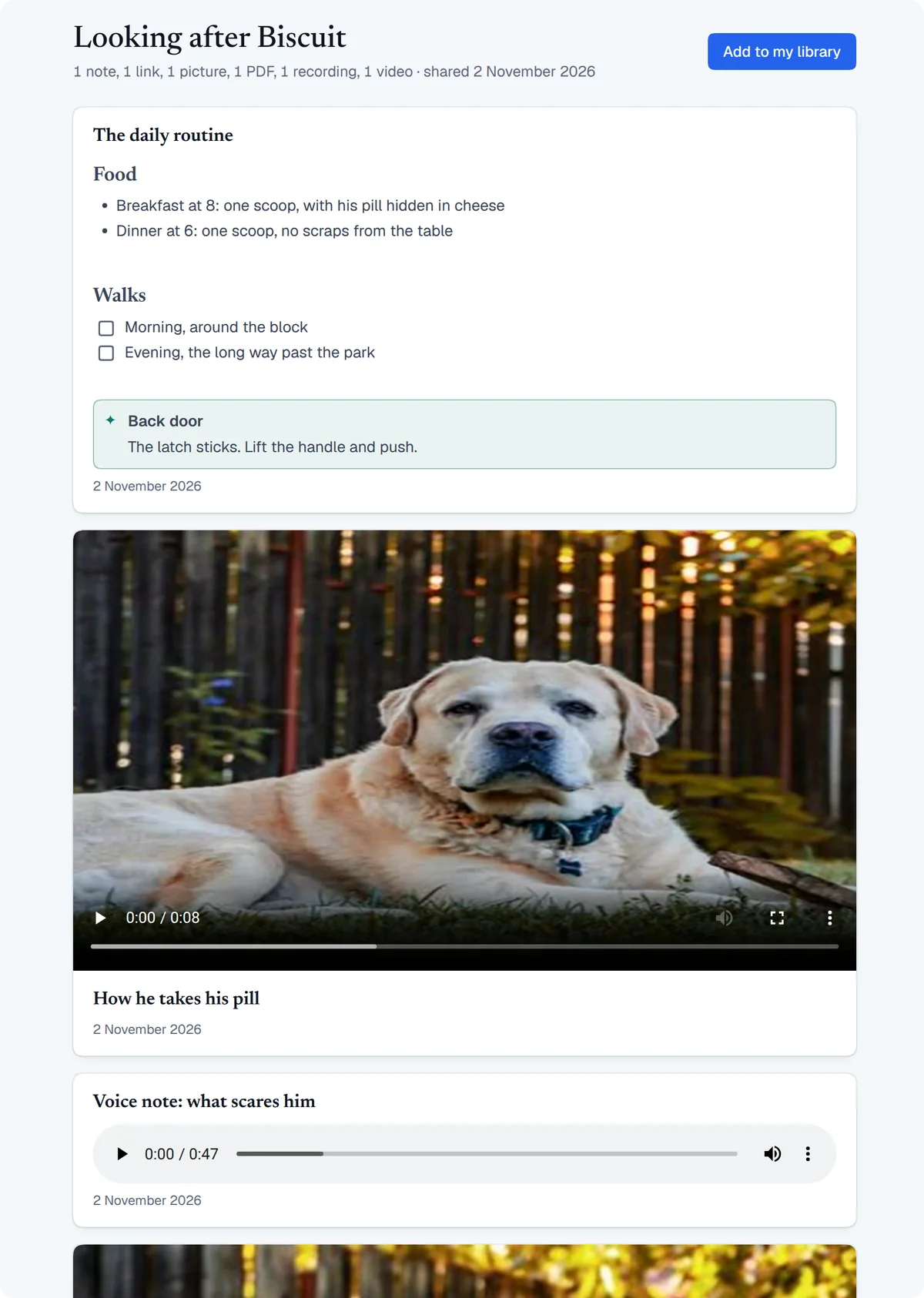
A .retmd file holds all of that in one file. It's a whole ReticulOS collection, with its notes, links, pictures, PDFs, recordings and videos in the order you arranged them. You send it the way you'd send any file. Your friend double-clicks it and everything opens on one page, with the video and the voice note playing right there.
It's new in ReticulOS 0.13.2, on Mac, Windows and Linux.
Why one file is a big deal
Most of what we send isn't really a single file. It's a few things that only make sense together, in a certain order, with a line or two saying what each one is for. File sharing was built around the file, so the set gets broken up on the way and the person at the other end has to put it back together.
Here's how that goes with what most of us use today.
| How you'd send it | Where it works well | Where it falls short |
|---|---|---|
| Chat messages | Quick, and everyone has a chat app | Each item is on its own, and new messages push them out of sight |
| A shared folder link | Big files you want to keep updating | It needs a connection and a link that stays alive, and a folder is a list of file names with nothing to say what to open first |
| A ZIP | Any kind of file, in one file | It has to be unpacked, and then it's a pile of separate files again |
| A PDF | Looks the same everywhere | It's made for pages, so the video and the voice note stay behind |
A .retmd | Notes, pictures, PDFs, sound and video on one page, offline | The other person needs ReticulOS to see it as a page, it isn't encrypted, and Word or Excel files don't go in |
A .retmd keeps the set whole. Your words stay next to the things they explain, the order stays the order you chose, and a video sits on the page between the note before it and the note after it. There's no link to expire and no account to share with, and once the file has arrived it works offline. That's why we see it as a new kind of file sharing: you send the whole thing you meant to send.
Four more things it's good for
The class someone missed
Your classmate was out sick for week 5. One .retmd gives them the lecture recording, the slides as a PDF, a photo of the whiteboard and your notes, in the order the class went. They work down the page once, and you don't get asked for each piece separately.
Handing over a flat
You're moving out and the next tenant needs to know how the place works. Put in the landlord's contact, a photo of the meter reading, a short video of how to restart the boiler and the PDF of the appliance manuals. They get one file they can keep for as long as they live there.
Handing over work
A project is finished, or a colleague is covering while you're away. Send the brief as a PDF, a screen recording that walks through it, links to everything that's live, and your notes on what's still open. The next person gets the context along with the files, and the context is usually the part that goes missing.
The family recipe
Your grandmother's recipe is a photo of a handwritten card, a recording of her explaining the part that isn't written down, and a video of your aunt folding the dough. Sent as one .retmd, it reaches every cousin in one piece, and each of them keeps their own copy.
Sending one
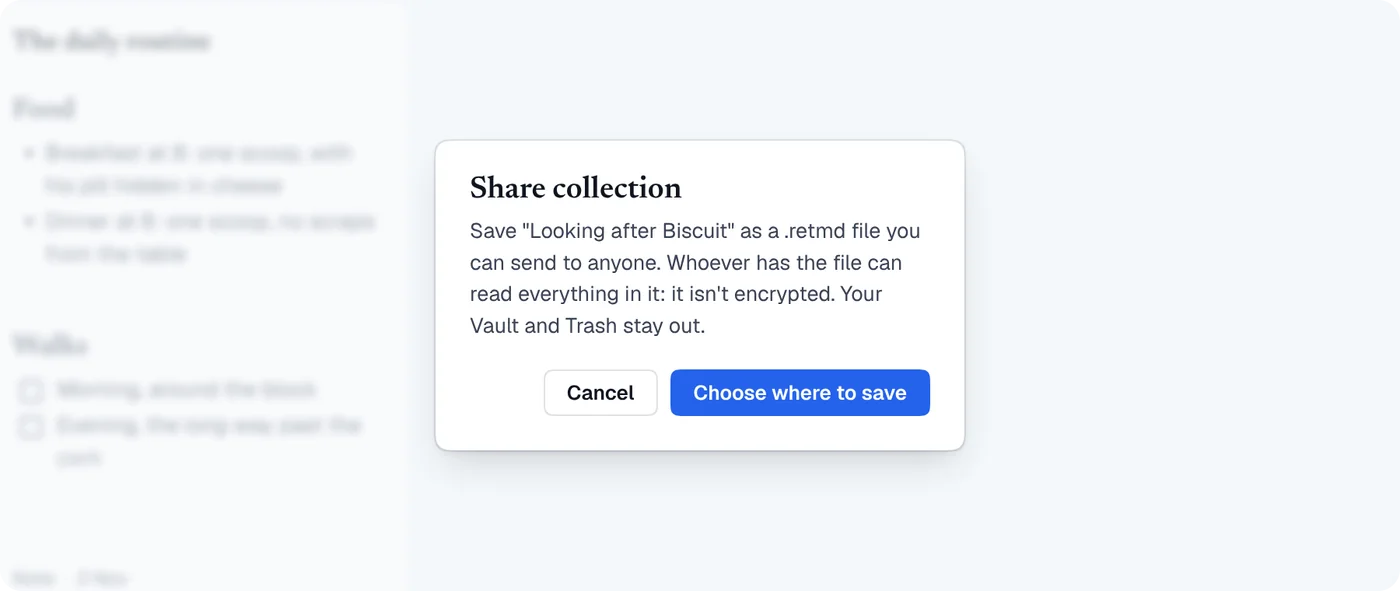
- Open the collection and press the share button at the top, or press CtrlK (⌘K on a Mac) and choose Share this collection.
- Read the note about encryption and press Choose where to save.
- Send the file however you normally send files: email, a chat app, a USB drive or a shared folder.
Tags, colors, pins and dates travel with the cards. Your vault and Trash stay out, and so does your day book, because only a collection can be shared. Sharing is free on every plan.
Here's what can go in:
- Notes and links, formatted the way you wrote them.
- Pictures in PNG, JPEG, GIF and WebP.
- PDFs, up to 50 MB each.
- Sound in MP3, M4A, AAC, WAV, OGG and FLAC, up to 200 MB each.
- Video in MP4, WebM, MOV, MKV and OGV, up to 200 MB each.
A file can hold up to 20,000 cards. Videos and recordings go in at full size, so a .retmd is about as big as what's inside it. A handful of notes and photos will fit in an email. A file with a few long videos belongs on a USB drive or in a shared folder.
Word documents, spreadsheets and other file types can't be saved to a collection, so they can't go in a .retmd either.
Opening one
Double-click it, or press CtrlK (⌘K on a Mac) in ReticulOS and choose Open a .retmd file.
It opens read-only in a window of its own, and nothing joins your library until you say so. Videos and recordings play in the window, pictures show in place, and a PDF opens in your computer's PDF viewer.
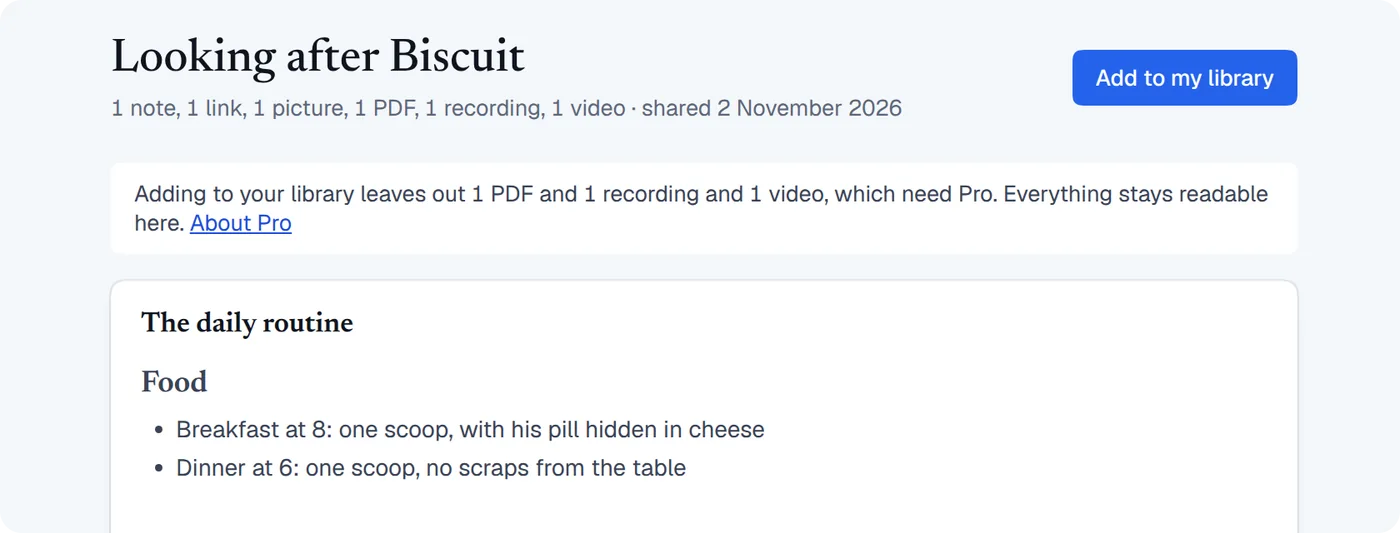
To keep it, press Add to my library. It always arrives as a new collection, so it can't change anything you already have. From then on it works like any other collection: you can edit it, search it and ask Ret about it, and Ret shows which card each answer came from. Your friend can ask “what time is his dinner?” while the dog waits.
Opening and reading are free. On the Free plan, adding brings in the notes, links and pictures. PDFs, recordings and videos join your library with Pro, Student or the Founder Edition, and they stay readable in the window on any plan.
If they don't have ReticulOS
The easiest answer is that ReticulOS is free to download and you don't need an account to open a file. If that's not an option, a .retmd is a ZIP with a different name. Rename it to .zip and any computer can open it:
Looking after Biscuit.retmd
├── README.txt       what this file is, in plain words
├── manifest.json    the title, and every card in order
├── cells/           the notes, as Markdown text files
│   ├── 0001.md
│   └── 0006.md
└── media/           the pictures, PDFs, recordings and videos
    ├── 44ac94b1…f6add.mp4
    └── …
The notes are plain text and the media are the original files, untouched. Their names in media/ are long codes, and manifest.json says which is which. What you send can still be read without us.
How ReticulOS handles a file from someone else
A .retmd usually comes from another person, so the app trusts nothing in it.
- It can only hold notes, links, pictures, PDFs, sound and video. There's no place in the format for programs or scripts, and HTML pages and SVG images are refused because they can carry code.
- Files have to be what they claim. ReticulOS checks the start of each picture, recording and video against its stated type, and won't show one that doesn't match.
- The window is shut off. It runs in a sandbox and can only ask about its own file, so it can't reach your library.
- Links stay web links. Only ordinary
httpandhttpslinks open. - Ret Agent reads it as someone else's words. Once it's in your library, notes reach Ret Agent the way a web page does, as something to read and not as orders to follow.
A PDF opens in your own PDF viewer, so take the same care with one from a stranger as you would with any PDF.
Make your first one
Update to ReticulOS 0.13.2, open the collection you'd otherwise send in five messages, and press share.
Questions
- How do I open a .retmd file?
- Double-click it with ReticulOS installed, or press Ctrl+K (⌘K on a Mac) in the app and choose Open a .retmd file. ReticulOS is free to download, and you don't need an account to open one.
- Can I open a .retmd file without ReticulOS?
- Yes. Rename it to .zip and open it with your computer's usual tools. The notes are Markdown text files in cells/, the pictures, PDFs, recordings and videos are in media/, and manifest.json says which is which.
- Is a .retmd file encrypted?
- No. Whoever has the file can read everything in it, and ReticulOS tells you so before you save one. Your vault and Trash are never included.
- Can a .retmd hold Word documents or spreadsheets?
- No. It holds what a collection holds: notes, links, pictures, PDFs, sound and video. Each PDF can be up to 50 MB, and each recording or video up to 200 MB.
- Do I need Pro?
- Sharing, opening and reading are free. On the Free plan, adding a file to your library brings in its notes, links and pictures. Adding its PDFs, recordings and videos is part of Pro, Student and the Founder Edition.
