Every note in ReticulOS is stored as RetMD. It's Markdown, the plain-text formatting most of the internet already uses, with a couple of additions like callouts and folding toggles. Most of the time you'll never see it, because the editor writes it for you. But knowing it makes you faster, and it's the reason your notes will outlive any app, including ours.
Why plain text underneath
Your notes stay yours. Because every note is readable text, exporting from ReticulOS gives you a folder of ordinary .md files, one folder per collection, with your pictures and files alongside. Any text editor can open them. So can Obsidian, and so can whatever comes next.
It's safe. RetMD is read by a deliberately strict parser that builds each note piece by piece. A note you captured from a dodgy web page can't sneak code into the app.
It's fast to write. The editor turns Markdown into formatting as you type, so you never have to leave the keyboard for the toolbar.
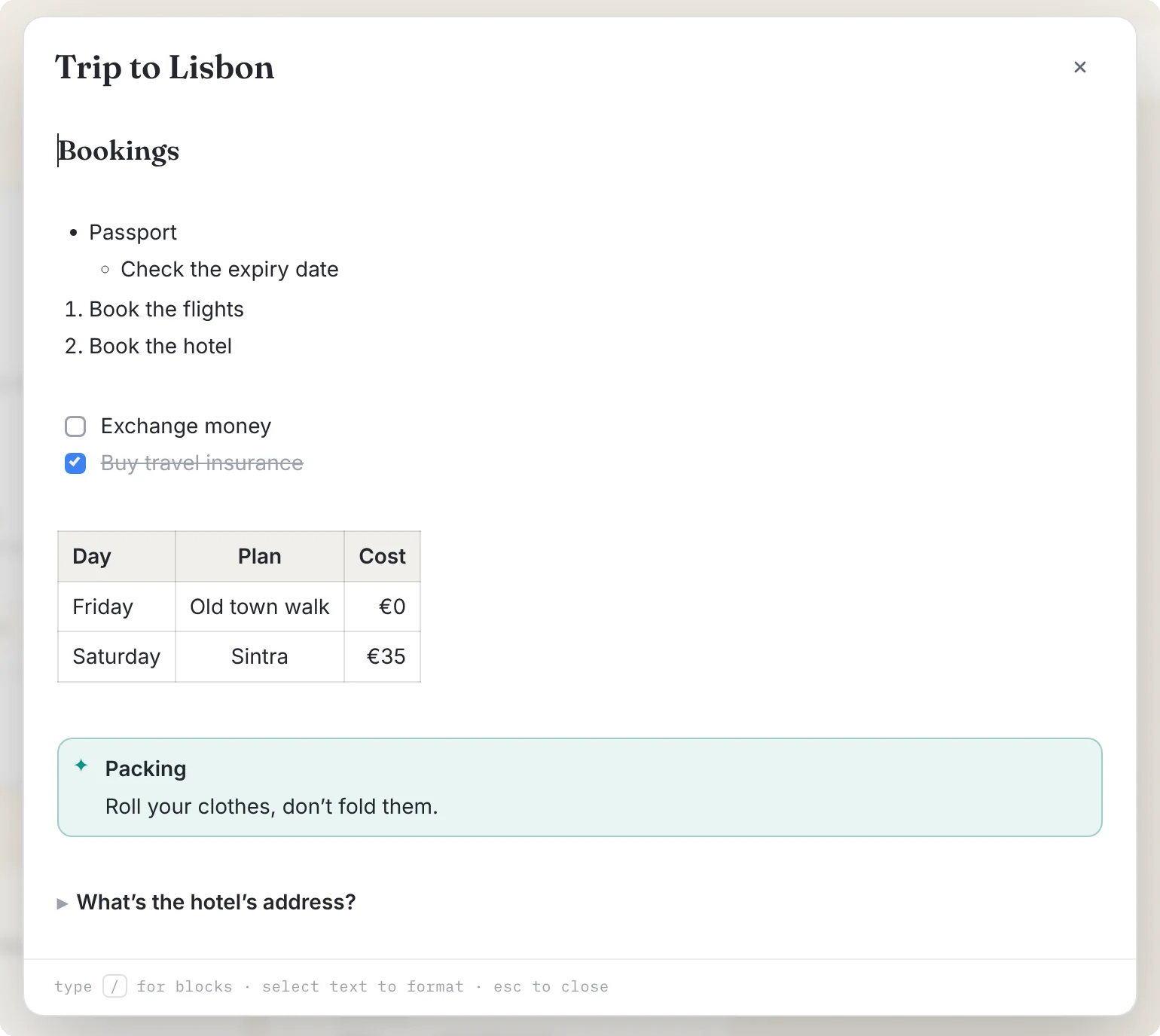
The building blocks
Here's the source of a trip-planning note, using most of what RetMD can do:
## Bookings

- Passport
  - Check the expiry date
1. Book the flights
2. Book the hotel

- [ ] Exchange money
- [x] Buy travel insurance

> Pack light. You'll walk everywhere.

---In the editor you'd never type most of that by hand. At the start of a line, each of these becomes formatting as soon as you press space:
| Type | Get |
|---|---|
#, ## or ### | A heading |
- or * | A bullet list |
1. | A numbered list |
[] | A checklist |
> | A quote |
--- | A divider |
Code
Three backticks start a code block. Add a language name after them and the block is labelled with it.
```js
const total = items.reduce((sum, item) => sum + item.price, 0);
``````js and a space to start one.Tables
Tables use the same pipe syntax as GitHub. The row of dashes separates the header, and colons in it set how each column is aligned.
| Day      | Plan          | Cost |
| :------- | :-----------: | ---: |
| Friday   | Old town walk |  €0  |
| Saturday | Sintra | €35 |In the editor, type /table to insert one, then Tab to move between cells. Tab in the very last cell adds a new row, and a small toolbar appears for adding or removing rows and columns.
Callouts and toggles
These are RetMD's own additions. A callout is a coloured box for something that should stand out, and comes in five kinds: note, tip, important, warning and caution. A toggle folds its contents away under a single line, which is perfect for long detail and for flashcards.
:::tip Packing
Roll your clothes, don't fold them.
:::

:::toggle What's the hotel's address?
Rua Augusta 100, Lisbon
:::In the editor, type /tip, /warning, /toggle and so on.
Inline formatting
| Type | Get |
|---|---|
**bold** | bold |
*italic* | italic |
~~struck~~ | struck through |
==highlighted== | highlighted |
`code` | code |
<u>underlined</u> | underlined |
[label](https://…) | a link |
Select text in the editor and a small toolbar appears with all of these, if you'd rather click. Links only work for web addresses starting with http or https, on purpose.
What's left out, on purpose
A few things common in other Markdown flavours aren't part of RetMD:
- Images inside notes. In ReticulOS a picture is a note of its own, which is what lets it be searched by what's in it.
- Embedded HTML. Leaving it out is part of what stops a captured note from carrying anything harmful into the app.
- Footnotes. Rarely missed in short notes, and they don't survive many exports well.
How Ret reads it
One more detail, for the curious. When Ret prepares a note for searching, RetMD is turned into clean text first: formatting marks are dropped, links lose their brackets, and each table row is written out with its column names beside the values. That's why Ret can quote the exact row of a table that answers your question, not just the note it's in.
