ReticulOS is meant to be used without breaking your concentration. The way it does that is shortcuts: six of them work from any app, so you can save something, search, or ask a question without switching windows. Here's each one, what it's for, and when you'll reach for it.
The six that work from any app
| Shortcut | What it does |
|---|---|
| CtrlShift= | Saves the text you've selected into the open collection |
| CtrlShift4 | Saves part of the screen as a picture |
| CtrlShift5 | Finds the values for a form on screen in your notes |
| CtrlShiftSpace | Switches the widget between your notes and Ret, the AI |
| CtrlShift/ | Searches everything, on top of whatever you're doing |
| CtrlShift\ | Shows or hides the widget |
Save the selection: [[Ctrl+Shift+=]]
This is the one you'll use most. Select some text anywhere, a sentence in an article, a command in the terminal, an address in an email, and press it. The text is saved as a note in whichever collection the widget is showing, and the widget pops up briefly to confirm. Your clipboard isn't touched, so whatever you copied before is still there.
Save part of the screen: [[Ctrl+Shift+4]]
For things you can't select, like a chart, an error dialog or a slide in a video call. Press it, drag a box, and the area is saved as a picture. Pictures are understood by what's in them, so you can find it later by describing it.
Find form values: [[Ctrl+Shift+5]]
Press it, drag a box around a form, and ReticulOS lists each field with a value from your notes and where that value came from, ready to copy. Fields it can't answer say so rather than guessing. The job-seekers post walks through it.
Switch to Ret: [[Ctrl+Shift+Space]]
The widget has two modes: Clip, your notes, and Ret, the AI you can ask about them. This shortcut flips between the two and brings the widget forward if it was hidden. Your conversation with Ret stays where you left it when you flip back.
Search everything: [[Ctrl+Shift+/]]
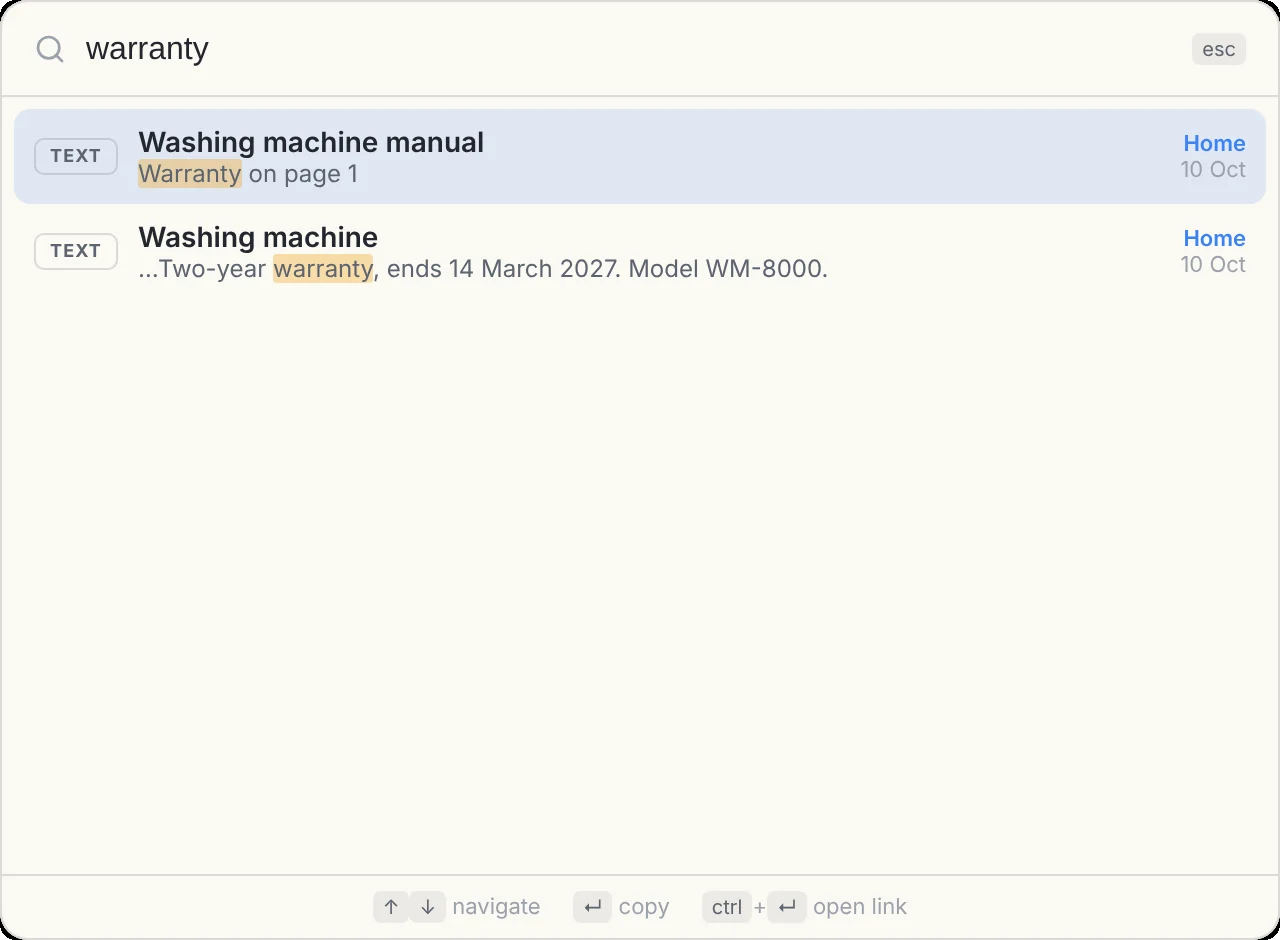
A search box appears in the middle of the screen, on top of whatever you're doing, and searches the titles and text of every collection at once. Arrow keys move through the results, Enter copies one, and Esc closes the box.
Show and hide: [[Ctrl+Shift+\]]
The widget floats above your other windows. This shortcut tucks it away and brings it back, exactly where it was. Closing the widget doesn't quit ReticulOS, by the way: it keeps running in your system tray, so the shortcuts keep working. To quit for real, right-click the tray icon and choose Quit.
In the widget and Reticulum
| Shortcut | What it does |
|---|---|
| CtrlEnter | Saves what you've typed as a new note, in the widget or Reticulum's capture bar |
| CtrlV | In Reticulum, with nothing selected, turns the clipboard into a note |
| Esc | Closes the editor, or clears a search |
You never need a save shortcut for notes you're editing: the editor saves as you type, and Esc closes it.
In the editor
| Shortcut | What it does |
|---|---|
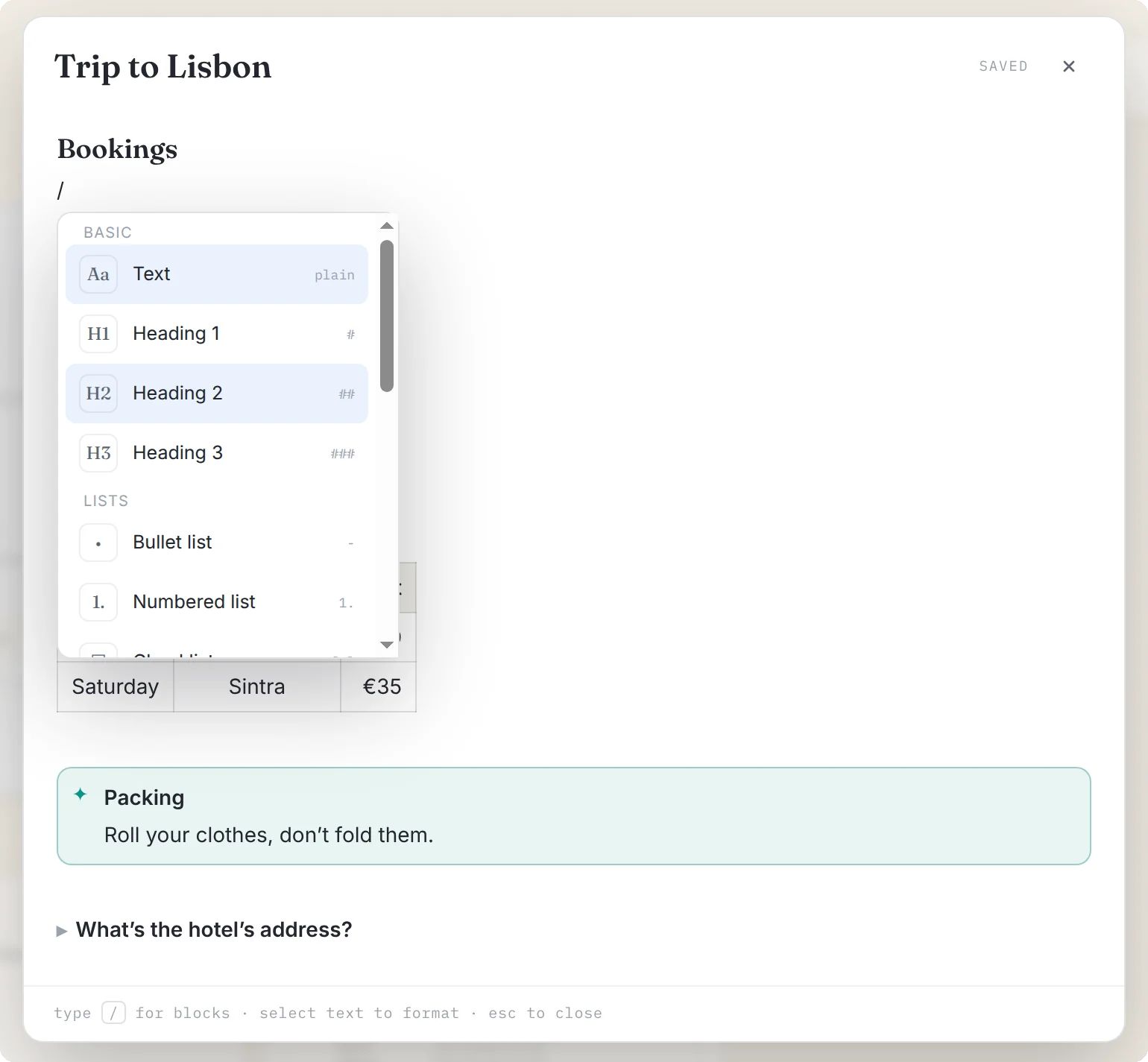
| / | Opens the block menu: headings, lists, checklists, tables, toggles, callouts and code |
| CtrlB CtrlI CtrlU | Bold, italic and underline |
| Tab / ShiftTab | Indents or outdents a list item. In a table, moves between cells, and adds a row from the last cell |
| Ctrlclick | Opens a link in your browser |
Markdown as you type
If you already know Markdown, you can skip the menu and type it. At the start of a line, these turn into formatting as soon as you press space:
| Type | Get |
|---|---|
#, ## or ### | A heading |
- or * | A bullet list |
1. | A numbered list |
[] | A checklist |
> | A quote |
``` | A code block (add a language, like ```js) |
--- | A divider |
Inline, wrapping words works too: **bold**, *italic*, ~~struck~~, ==highlighted== and `code`. The full format is in the RetMD walkthrough.
