The same questions, forty times
If you've applied for jobs recently, you know the rhythm. Every company's form asks for your name, your email, your notice period, your portfolio, a paragraph about why you want the role and a paragraph about your experience. They ask in slightly different words, in slightly different boxes, and you end up retyping the same answers forty times, with a growing sense that the version you sent last Tuesday was better.
There's a better way to work: write each answer once, keep it somewhere you trust, and reuse it.
Build a job-search collection
Make one collection for the whole search and put the things you reuse at the top:
- Your current CV. Add the PDF from the + menu with Add PDFs, then pin it so it always sits first.
- A short bio. Two or three sentences you're happy with. Pin it too.
- Your links. Portfolio, LinkedIn, GitHub, whatever's relevant.
- The small facts. Notice period, the date you could start, the salary range you're aiming for. One short note each.
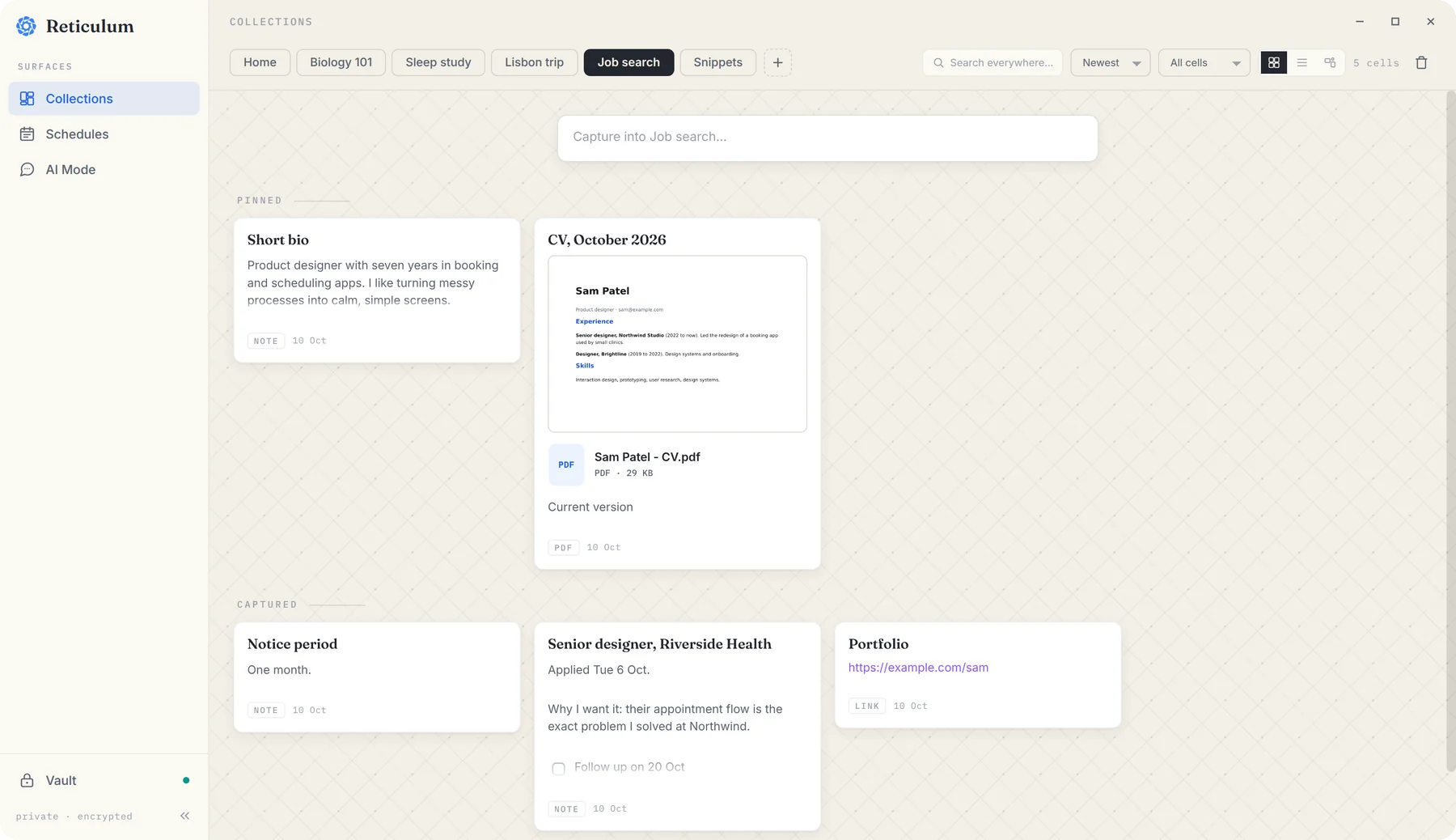
Then, every time you find a role worth applying for, save a note about it: the posting's link, and a line on why you want it. That line is gold later, both for cover letters and for interviews.
Fill in forms from what you saved
This is the part that saves the most time. When you're looking at an application form:
- Press CtrlShift5, or choose Find form values… from the ReticulOS icon in your system tray.
- Drag a box around the form on your screen.
- ReticulOS reads the form, works out what each field is asking for, and looks for the answer in your notes.
- A panel lists every field with the value it found and the note that value came from. Click Copy next to a value and paste it into the form.
Fields it can't answer from your notes are marked Not found in your notes. It never invents a plausible-looking answer, because a confident wrong answer in an application is worse than an empty box.
Draft from your own words
For the longer answers, “why this role?” and “tell us about a project”, switch the widget to Ret with CtrlShiftSpace and ask it to draft something from your notes: “Write a short answer to why I want the Riverside Health role, using my bio and my notes on the posting.”
What comes back is built from what you saved, and each sentence that leans on a note carries a small numbered citation, so you can see exactly which bits of your own writing it used. Edit it, make it yours, and if it's good, save it back into the collection for next time.
Keep track of where you are
The day book in Reticulum makes a natural application log. On the day you apply, add an entry with the company, the role, and a to-do to follow up, and tag it applied.
Two things then happen without you having to remember anything. Follow-ups you haven't ticked off appear on today under Carried forward. And picking the applied tag shows every application you've made, across every day, in one list. That's your pipeline, without a spreadsheet.
A note on privacy
Your CV, your salary expectations and your notes on each company stay in an encrypted database on your computer. They only leave it when you use form filling or ask Ret something, and then only what's needed: the passages that answer the question, plus the picture of the form you selected.
Questions
- Does my résumé leave my computer?
- Your notes stay in the encrypted database on your computer. When you use Ret or form filling, the passages needed (and, for forms, the picture of the form) go to the AI service you use.
