Your AI doesn't know what you know
AI assistants are very good at general knowledge and very bad at yours. Claude can explain how deployments work in general, but not how you deployed the staging server in March. Cursor can write a function, but not the one your notes say you already wrote. The context that would make them genuinely useful is sitting in your own notes, out of reach.
MCP fixes that. It's an open standard, the Model Context Protocol, that lets AI apps use outside tools. ReticulOS speaks it. Connect your AI app once, and it can search the notes you've saved in ReticulOS, read the ones it needs, and tell you where it found things.
It's free on every plan.
Which apps
Any app that supports MCP. The ReticulOS settings give you ready-made setups for the common ones:
- Claude Code, with a single command to paste into your terminal.
- Cursor, with a config to add to its MCP settings.
- Claude Desktop, with a config for its settings file.
- Codex and other MCP apps, using the address and token shown in settings.
What a connected app can do
A connected app gets a small, deliberate set of tools. Some it can use freely. Others need your yes every single time.
| Freely | Only after you approve |
|---|---|
| Search your notes | Create a note |
| Read a note, including PDF pages and pictures | Edit a note |
| List your collections and the notes in them | Create a collection |
| Read a day in your day book | Move a note to the trash, or add to the day book |
And some things are simply off the table. A connected app can never open the vault, never delete anything permanently, and never rename or remove a collection.
Setting it up
- Press CtrlShiftSpace to switch the widget to Ret, then open its settings with the gear.
- Find Connect AI apps (MCP) and switch it on. The status changes to show the address it's listening on.
- Copy the setup for your app, using the buttons in that section.
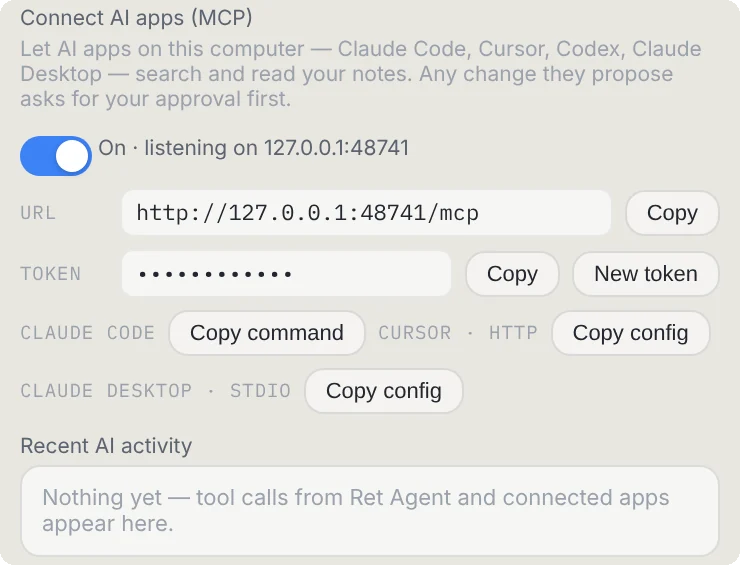
Claude Code
Select Copy command next to Claude Code and paste it into a terminal. It looks like this, with your own token filled in:
claude mcp add --transport http reticulos http://127.0.0.1:48731/mcp \
--header "Authorization: Bearer <your token>"Cursor
Select Copy config next to Cursor · HTTP, and add it to Cursor's MCP settings. It names the ReticulOS address and passes the token along with each request.
Claude Desktop
Claude Desktop talks to tools in a slightly different way, through a small bridge program that ships inside ReticulOS. Select Copy config next to Claude Desktop · stdio and add it to Claude Desktop's configuration file. The config already points at the right place on your computer.
Try it
Once your app is connected, ask it something only your notes know:
- “What did I save about the kitchen renovation quotes?”
- “Using my Snippets collection, how do I deploy the site?”
- “What's on my day book for Thursday?”
Your AI app will search ReticulOS, read what it needs, and answer, telling you which notes it used.
How it stays safe
Giving an AI app access to your notes should make you a little cautious. Here's what keeps it in check.
- Your computer only. The connection runs inside the ReticulOS app itself and only accepts requests from apps on the same computer. Nothing is opened up to your network or the internet.
- A token. Every request needs the token from settings. If you ever want to cut everyone off, New token disconnects every connected app at once.
- You approve every change. When an app wants to create or change something, ReticulOS shows a dialog naming the app and describing exactly what it wants to do. If you don't answer within two minutes, the answer is no.
- Everything is listed, and undoable. Recent AI activity, in the same settings panel, lists every change an app has made, each with its own Undo.
Coming next
If you use ChatGPT, there's another way to bring it to your notes on the way: Sign in with ChatGPT will let Ret answer from the ChatGPT plan you already pay for.
Questions
- Do I need Pro?
- No. Connecting AI apps is free on every plan.
- Does my data go to the AI company?
- The notes your AI app reads become part of that conversation with its provider, just like anything else you paste into it. Nothing else leaves ReticulOS.
